Installation of the Windows Twingate Client fails with: "Setup wizard ended prematurely."
Last updated: April 3, 2026
Applicable to:
- Supported Windows operating systems
- Twingate Component: Windows Client
Overview
Sometimes, the Twingate Windows Client will produce this error, and can be caused by a variety of issues, with varying solutions.
Reviewing the Client logs can narrow things down, or by leveraging a verbose installation script from CLI as opposed to auto-install via MSI or EXE.
Symptoms
The installation of the Windows Twingate Client fails / rolls back, usually with an error that the "Setup wizard ended prematurely."
Solution
You can generate an install log with:
’[path]\TwingateWindowsInstaller.exe’ /L*V "TGinstall.log"
The results of the install log can help narrow the scope of troubleshooting.
If installing via MSI, validate that the correct .NET Desktop Runtime is installed:
- Versions 2024.311 and newer require .NET 8.X Desktop Runtime
- Versions 2024.297 and older require .NET 6.X Desktop Runtime
The EXE should automatically install its respective .NET Desktop Runtime.
If the appropriate .NET Desktop Runtime is installed, and you still get the premature setup failure notice, repair WMI:
- Open CMD As Administrator and run:
mofcomp %windir%\system32\wbem\cimwin32.mof
...and try installing again.
If repairing WMI fails, disable MSI rollback:
Follow instructions here:
...then restart, then reinstall.
If disabling MSI rollback fails, uninstall Twingate, and remove errant NetworkProfile entries:
- Open regedit
- Browse to
HKEY_LOCAL_MACHINE\SOFTWARE\Microsoft\Windows NT\CurrentVersion\NetworkList\Profiles - Click into each GUID value to identify GUID keys that contain entries of Twingate with the
ProfileNameofTwingate - Delete any GUID key where
Twingateis found
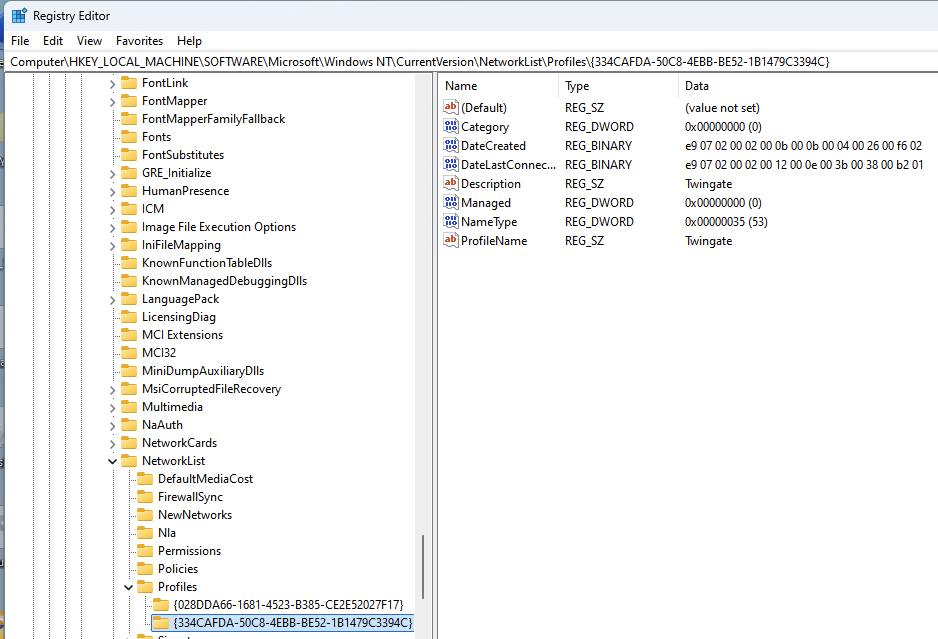
- Once all
Twingateentries are removed, restart and reinstall
If all of the above fails, check for OS corruption:
Follow instructions here:
Where:
- Open CMD As Administrator, then:
sfc /scannow
...then restart, and retry.
We also recommend CCleaner in more extreme cases where we suspect OS corruption.
Note
For silent installs of the client with its prerequisites, the EXE installer must be run with specific args in a specific order, as shown below:
TwingateWindowsInstaller.exe preq_share=true /quiet